Tampilkan postingan dengan label and. Tampilkan semua postingan

NCH iPhone and Android Update The Express Dictate iPhone App is here

Update: Express Dictate for Android is now available. You can Get Express Dictate for Android from Google Play or Amazon


Pocket Dictate iPhone Dictation SoftwareThats right, I am finally making good on my promises of NCH iPhone applications. (July 2009: NCH Starting development for iPhone)

Pocket Dictate has been approved by Apple and is officially available and free to download through iTunes for your iPhone, making our range of digital dictation software nearly complete. You can use any of the applications in our dictation suite to record your dictations almost anyway you choose:

Express Dictate for your Mac or PC for easy computer dictation. You can also use Express Dictate with a portable dictation device, and simply dock and send your dictation files when you are back at your desk.

Pocket Dictate is the mobile version of Express Dictate which can be downloaded for your Pocket PC, Windows Mobile or Palm OS devices--and now your iPhone as well. A Droid version is currently under development, which will round out all your portable devices.

Web Dictate lets you set up a web dictation server so you can log in and record dictation files anywhere with a microphone and an internet connection.

With Dial Dictate, you can set up a phone-in dictation system, so that you can have a dedicated phone number to call whenever you need to make a dictation.

With all of these different choices you would be hard pressed to not find a solution that will work well for you.

So whats next for NCH apps?
As I mentioned, Pocket Dictate for Droid is on its way. We are also planning on porting PitchPerfect Instrument Tuner, WavePad Audio Editor, RecordPad Sound Recorder, and TempoPerfect Metronome Software for both the iPhone and Android. Those will keep us busy for a little while longer, but Im sure there will be even more to add to the list after that, so if there are any of our products that you are dying to have on your phone, or if you have any feedback on Pocket Dictate be sure to let us know.
Read More..

Sony Xperia V Photos and Specifications

Sony Xperia V Photos

Read more »
Read More..

Another Day And The Fog Rolls Back In A Little

I was feeling so good last night, as my blogging activity made clear. I actually slept past my usual time for 500 mg acetaminophen dosage this morning. This alone is an improvement for which Im quite grateful.

However, once I completed the physically demanding activity of showering and getting dressed, the anesthetic fog rolled back in, and I accomplished nothing this morning. Im feeling a little better now, but it is definitely a series of wins and loses each day to get myself back to where I was.

Update: I have noticed that I am sometimes dizzy in the mornings; perhaps because these medicines designed to keep my blood pressure low until all of the repairs have been completed are an issue, or perhaps because I belong on all four hooves.
Read More..

3rd Philippine PyroMusical Competition Schedule and Info

Like the previous years, we've always attended the Pyromusicals and Pyrolympics. It is usually held in Mall of Asia but there was one year that it was held in Fort Bonifacio Global City. This year, it will be held in Mall of Asia again. Every year brings a different surprise to the viewers. From heart shape fireworks to Hello Kitty like figures, it never fails to amaze people of all ages!
Get ready for the Brightest show on Earth. The 3rd Philippine International Pyromusical CompetitionAt SM Mall of Asia, the sea and sky meet for the most breath-taking display of explosive colours and electrifying music, the world has ever known. 

If you are as excited as I am to watch this years Pyromusical, here's the schedule for the 3rd Annual PyroMusical Competition (February 11 to March 17, 2012)
Read more »
Read More..

VFX Sound Driven Motion Bake and Unbake

Here is a follow up to my previous experimental post (Perfume) that is more or less related to sound, motion, and animation.
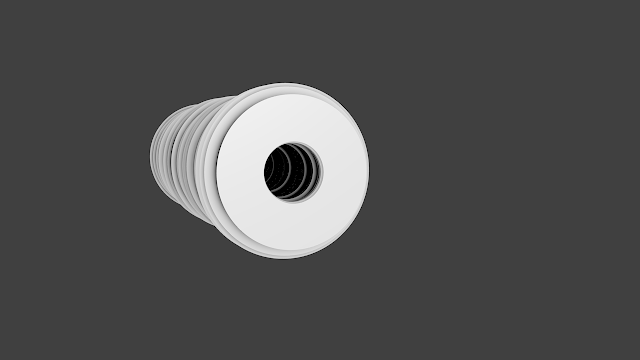
The result of previous experiment. Just array of disc spawn and scaled based on Audio.

CREATIVE AUTOMATION
Recently, I am into topics where we can drive or automate or trigger certain actions.

It is not really new, but we do have more technology these days that allow us to further develop whatever ideas that we may already have in the past but stuck. Things like: Kinect Motion Capture, Augmented Reality and AR Glass, Mobile Devices, 3D Printers, 3D Scanner, Arduino, etc. They are all available.

It is as if nowadays, we are applying more and more "Game Environment" automation into "Real World".

Those areas are really interesting to me. I just wish I know more people that actually working on such projects and I dont have to rely on my brain alone. I will look around if maybe University around here have some space where I can research and learn more about all these.

And of course, since this blog is about Blender, I want to see some kind of real-time setup using Blender happening on my own personal computer.

I remember many years ago, I researching on how to do this kind of audio-driven animation using Maya (MIDI Driven). It was a dumb effort. There was actually a clever MEL script that kind of does it, but in the end the script is discontinued or kind of limited.

And then there is Houdini. I can see that Houdini CHOPs is actually perfect of Audio Driven Animation. Andrew Lowell released a book few years ago to cover this:
http://www.andrew-lowell-productions.com/andrew-lowell-productions/resources.html

I have not get my head around Houdini to be able to confidently create anything. But I have a bit more time now, I will look into it further soon.

What I like about Blender is that Blender is somewhat open to creative projects like this. And somewhat I got to know clever artists out there to help me with my random questions.

Anyways, a bit off topic, lets get back to Blender and see how Blender handles audio-motion.

RESEARCH ON BLENDER AUDIO-MOTION
A quick browsing around the Blender Artist forum for AUDIO RELATED post, there are apparently heaps already. I really have to do a little bit more research and testing all the tools to actually write a useful post.

batFINGER Speaker Tools Script Thread
http://blenderartists.org/forum/showthread.php?236729-Speaker-Tools-(Audio-Visualiser-Driver-Lipsync-)

MIDI Driven Thread
http://blenderartists.org/forum/showthread.php?182443-MIDI-driven-animations

There are also this from Japan Blender artist/developer:
Blender Real-time Lipsync Tool from Microphone
https://vimeo.com/38157187

I did try that Real-Time Lipsync Tool, but got stuck. Well, maybe I need to spend a bit more time on it. That Real-Time Lipsync Tool requires a few 3rd party softwares outside Blender. It feels complicated, but maybe not that complicated once understood. It has interesting potential.

Not long ago, I also stumbled a few good video tutorials on Blender audio driven animations (was pointed by Pavel yesterday). I shall look into them again soon.
http://cgcookie.com/blender/2011/06/02/building-an-audio-visualizer-in-python/
http://www.blendernation.com/2012/01/17/audio-driven-animation/


MAKE SOMETHING ANYWAY
So, I guess I am a total newbie in this audio-motion area. Exactly like when I started to learn Blender, it took me a while to filter all the information and trying to make sense of things (-__-)b

Anyways, let first review things that we already know.

1. BAKING SOUND TO F-CURVES

It cannot be any easier than this. This is actually one of the feature that gives me a big surprise when I first learned Blender 2.5x.

Firstly you start with some kind of keyframe on any object. Specify what parameter you like to bake sound into and create a keyframe there (so that you can later bake sound into it).

Inside Graph Editor, all you need to do is to Bake Sound to F-Curves. Point into audio WAV file (or MP3 audio file will work as well).

On the file import panel you will see Bake Sound to F-Curves option on the left side bar:
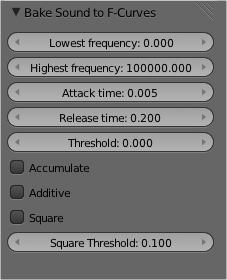
Pay attention to the Lowest and Highest frequency.

The resulting F-Curves:


NOTE: I like to do this to an Empty so I could then set it up to drive something else. Maybe one could try on a Bone or Armature as well and let it drive something?

2. UNBAKING F-CURVES
This one awesome script comes from Liero called UNBAKE. With unbake add-on script, you can basically convert those "baked" F-Curves into:
1. 3D Curve Path

Also read:
http://blenderartists.org/forum/showthread.php?244692-waveform-data-to-3D-object

2. Editable F-Curves

And even more, this "Unbake" script from Liero has extra options, especially for "unBake to 3D", if you check Use Radius, you will get a straight curve but with Extrusion.


Do that above and apply Build Modifier on top, and you have something that similar to my previous experiment. Its all procedural.

Now, we know that Blender Curve is special. It can store Radius on each points. And if you parent a Mesh into it to Follow Path, the mesh will understand the Radius and will Scale up and down based on that radius. Therefore .... you can have something like this: (thats particle emitted).
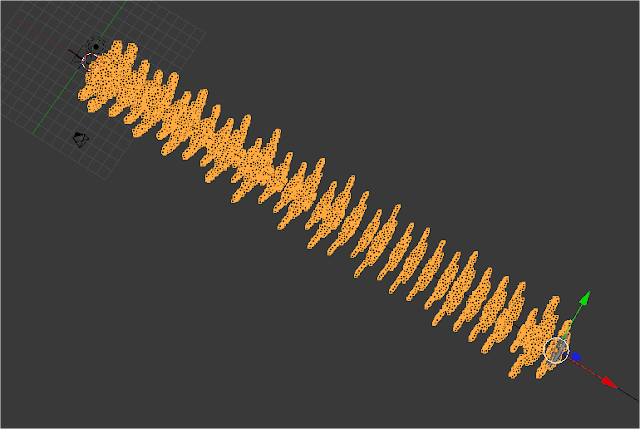
How cool is the UnBake Script? Tell me about it, I did not even know this is possible.

WHAT CAN WE DO WITH IT
Alright, we got some interesting raw data to work on. What can we do with it? That is exactly the question I am still trying to answer while writing this....

Normalize? New Min Max?
I think we need to NORMALIZE this curve first. I dont know quite how to do that in Blender yet. But the idea is to turn this F-Curves into 0 to 1 value and map into new min and max value that is more usable.

You could clamp the value using Limits Modifier. I am not quite sure yet with Normalize.

Further Modification of F-Curve


Since Baked Audio is now an F-Curve, you can further modify the curve using F-Curve Modifier. Lots of interesting Modifiers there, such as Stepped, which turn the curve into something that looks like a random city buildings.

Using that Unbake Curve As Motion Path
Right away, you can simple use that path as a Motion Path. Maybe parent an object and let it emit Particles or Smoke. Or perhaps parent a Brush object to paint on Dynamic Paint Canvas to create something that looks like a graph. I am sure there are many cool motion graphics music video done that way. Here is one:
https://vimeo.com/6045312

I want to do some smoke, but its just at the moment I ran out of HDD on my computer. And smoke requires some GBs and also time consuming baking and testing.

Array Modifier and Curve Modifier?
This is Lieros suggestion, I dont understand how to manipulate object so that it affects the "Scale" or "Array" objects. But I am getting something like this by using that Curve generated from Sound.


Array and Sound
Array (Copy) Counts seems to have a nice potential. Let see if we could drive the value of Counts using the data from sound wave:
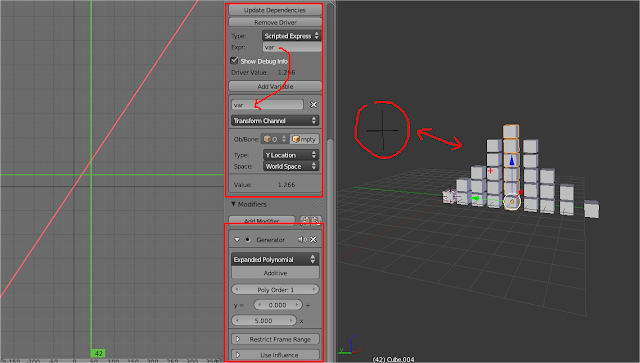
Yes, it is quite easy to drive array copy with Audio Bake using Drivers.
That setup can give a very simple type of Sound Visulization without any scripting.

If you can somewhat offset and animate the Curve, you can have something that is more interesting. Kind of like a moving mountain of arrays. The long way to do this is to use Drivers.

Displace Modifier
Just connect the wave into the Strength of Displace Modifier and you get something that looks interesting.

Dynamic Paint
Sound Driven Painting.... it might be interesting.

Alright, I stop there for now. I think Sound Driven Animation/Motion is interesting but I need to do a bit more research on sound visualization and all kind of sound to visual experiments that have been done before.

I think if know Blender a little better in the future, it is possible to create Interactive Game that uses Motion to Drive or Trigger Animation using Blender Game Engine (BGE). I wish someone could point me to it.
Read More..

Get all process and thread in Visual Basic

Get all process and thread in Visual Basic


You could get all the process running on your computer in visual basic with a very simple command. Use the Process.GetProcesses method to get almost everything on process on your Windows.


Private Sub Button2_Click(sender As System.Object, e As System.EventArgs) Handles Button2.Click
        Dim oAllProcess() As System.Diagnostics.Process
        Dim oProcess As System.Diagnostics.Process
        Dim str As String
        Try
            str = ""
            oAllProcess = Process.GetProcesses()
            For index1 = 0 To oAllProcess.Length - 6 Step 5
                oProcess = oAllProcess(index1)
                str = str & oAllProcess(index1).ProcessName & "     " & _
                    oAllProcess(index1 + 1).ProcessName & "     " & _
                    oAllProcess(index1 + 2).ProcessName & "     " & _
                    oAllProcess(index1 + 3).ProcessName & "     " & _
                    oAllProcess(index1 + 4).ProcessName & "     " & _
                    oAllProcess(index1 + 5).ProcessName & vbCrLf
            Next
        Catch ex As Exception
        Finally

            MsgBox(str)
        End Try
      

    End Sub


How could you get all the threads in a process?
Is very simple, use the same process method to get all the thread running under each process. Using the same loop, use the property .Threads

Here is a sample and this could give you al lot of information on threads and process on your computer:


    Private Sub Button1_Click(sender As System.Object, e As System.EventArgs) Handles Button1.Click
        Dim oAllProcess() As System.Diagnostics.Process
        Dim oProcess As System.Diagnostics.Process
        Dim str As String
        Try
            str = ""
            oAllProcess = Process.GetProcesses()
            For index1 = 0 To oAllProcess.Length - 6 Step 5
                oProcess = oAllProcess(index1)
                str = str & oAllProcess(index1).ProcessName & " " & oAllProcess(index1).Threads.Count & "     " & _
                    oAllProcess(index1 + 1).ProcessName & " " & oAllProcess(index1 + 1).Threads.Count & "     " & _
                    oAllProcess(index1 + 2).ProcessName & " " & oAllProcess(index1 + 2).Threads.Count & "     " & _
                    oAllProcess(index1 + 3).ProcessName & " " & oAllProcess(index1 + 3).Threads.Count & "     " & _
                    oAllProcess(index1 + 4).ProcessName & " " & oAllProcess(index1 + 4).Threads.Count & "     " & _
                    oAllProcess(index1 + 5).ProcessName & " " & oAllProcess(index1 + 5).Threads.Count & vbCrLf

                oProcess = oAllProcess(index1).Threads.Count
            Next
           
        Catch ex As Exception
        Finally

            MsgBox(str)
        End Try

    End Sub


Read More..

Time Date and Zone Changes


How to change Time Date & Zone 


Read More..

Javascript detect active window and mouse moving stop

Facebook wont update the new post on wall if you didnt move your mouse on the screen. It is because Facebook want to save bandwidth when you are not viewing facebook website. For example, if you open facebook website, but you away from keyboard/computer for 3 hours, maybe u go toilet or go out to work, facebook will not waste bandwidth to update new posts on wall. Facebook know you are afk by detecting your mouse movement. The same as Gmail switches your chat status from away to online / busy when you werent having your gmail tab active for a while.

For my case, my website keep auto reload a javascript function for every 10 seconds by setInterval( "checklatestmsgidLive();", 10000 ); The function will still keep reloading the function even when the user is viewing other website on other tab. How to stop reloading it when the user is on other tab? How to make it reload the function only when the user is viewing my website? To do that, I just need to use window.onfocus and window.onblur function, but too bad IE cannot support it, so need modify the codes, adding if (/*@cc_on!@*/false) to detect whether or not the browser is IE. So now I can detect the user is on other tab or is active on my website. I also added mouse movement detection to determine the user is viewing my website by document.onmousemove. Too bad there is no document.onmousestop function, so need to do some trick on document.onmousemove function. Below is the codes :

<div id="test" style="color: black;">
mouse is stop</div">

<div id="test2" style="color: black;">
pause</div">


<script type="text/javascript">
document.onmousemove = (function() {                   
  var onmousestop = function() {
   document.getElementById(test).innerHTML="mouse is stop!!!";
  }, thread;

  return function() {
      document.getElementById(test).innerHTML="mouse is moving!!!";
    clearTimeout(thread);
    thread = setTimeout(onmousestop, 200);
  };
})();

function onBlur() {
    document.getElementById(test2).innerHTML="window is inactive, pause everything!";
};
function onFocus(){
     document.getElementById(test2).innerHTML="window is active";
};

if (/*@cc_on!@*/false) { // check if it is Internet Explorer the double c on is jsript that only ie has
    document.onfocusin = onFocus;
    document.onfocusout = onBlur;
} else {
    window.onload=window.onfocus = onFocus;
    window.onblur = onBlur;
}
</script>

You can view the Demo here.
Read More..